

Form validation has become never been easy like before. If you havent heard of jQuery, then its time to get know now. Jquery is an open source set of javascript library, that brings user interactivity in web applications so easy even for a beginner with just few lines of code.
In this tutorial, i am going to show how easy to validate a form with jquery. For this you will need to download the following:
JQuery Library – http://jquery.com
JQuery form validation plugin – http://bassistance.de/jquery-plugins/jquery-plugin-validation/
Lets say we are going to validate a registration form like shown below..
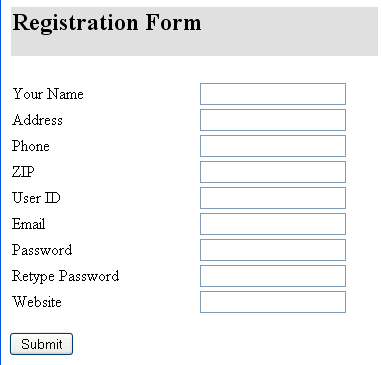
Step 1:
Place the javascript files within the head section
[code lang=”javascript”]
<script type="text/javascript" src="js/jquery-1.3.2.min.js"></script>
<script type="text/javascript" src="js/jquery.validate.min.js"></script>
<script>
$(document).ready(function(){
$("#registerForm").validate();
});
</script>
</head>
[/code]
You should set the name and id of your html form same as $(“#registerForm”).validate();
Step 2:
For each required form element just place class=”required” and specify minlength tag inside it. For example
Name field -> class=”required”
Email field -> class = “required email”
[code lang=”html”]
<input name="name" type="text" id="name" class="required">
<input name="user_id" type="text" id="user_id" minlength="4">
<input name="user_email" type="text" id="user_email" class="required email">
[/code]
Thats it! you will be able to validate form field textboxes without any advanced code.
For optional fields, you can specify class=”optional” or just leave it.
Step 3
In this last step you will add some styles to the error messages in the stylesheet.
[code lang=”html”]
.error {
font: normal 10px arial;
padding: 3px;
margin: 3px;
background-color: #ffc;
border: 1px solid #c00;
}
[/code]
Thats it! see how the validation works like a charm..
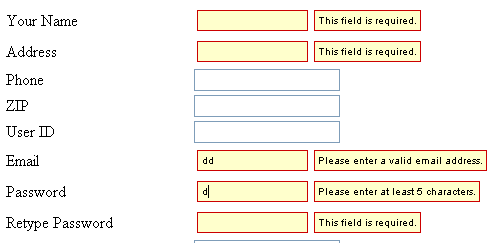
Advanced Validation
The following are some of bit advanced validation code that might help you.
To check password and password retype are same
[code lang=”javascript”]
<tr>
<td>Password</td>
<td><input name="pwd" type="text" id="pwd" class="required" minlength="5"></td>
</tr>
<tr>
<td>Retype Password</td>
<td><input name="pwdc" type="text" id="pwdc" class="required" equalTo="#pwd"></td>
</tr>
[/code]
To validate a website URL – optional field
It should check the URL and force the user to enter full url with http.
[code lang=”javascript”]
<tr>
<td>Website </td>
<td><input name="web" type="text" id="web2" class="optional defaultInvalid url">
<span class="example">http://www.example.com</span></td>
</tr>
[/code]
To validate Phone Number
We dont want restrict phone numbers to be US only. Suppose if a foreign person enters a phone with + and dashes, we want that as well. To do this you will need to make slight change inside document.ready() in head section.
[code lang=”javascript”]
<script>
$(document).ready(function(){
$.validator.addMethod("NumbersOnly", function(value, element) {
return this.optional(element) || /^[0-9\-\+]+$/i.test(value);
}, "Phone must contain only numbers, + and -.");
$("#regForm").validate();
});
</script>
[/code]
and now you can validate specifying class=”required NumbersOnly”. This will allow only numbers 0-9, hyphen and + for country code.
[code lang=”html”]
<tr>
<td>Phone</td>
<td><input name="phone" type="text" id="phone" class="required NumbersOnly"></td>
</tr>
[/code]
Validating Username with no special characters
We dont want username to contain any special characters like dot,slashes etc. We only want to allow alphabets, numbers and underscore.
We create a function similar way like above
[code lang=”javascript”]
<script>
$(document).ready(function(){
$.validator.addMethod("username", function(value, element) {
return this.optional(element) || /^[a-z0-9\_]+$/i.test(value);
}, "Username must contain only letters, numbers, or underscore.");
$("#regForm").validate();
});
</script>
[/code]
and now you can call using class=”required username”
[code lang=”html”]
<tr>
<td>User ID</td>
<td>
<input name="user_name" type="text" id="user_name" class="required username" minlength="4">
</td>
</tr>
[/code]
Enjoy jQuery!
