
 For many reasons to run a gallery or a slideshow you will need to know attachment ID of the photo or image you uploaded.
It is very easy to find out attachment id. Just click on picture > gallery > click on the show > then place your mouse above the image, you will see a number.. like attachment_id=45 in the URL statusbar.
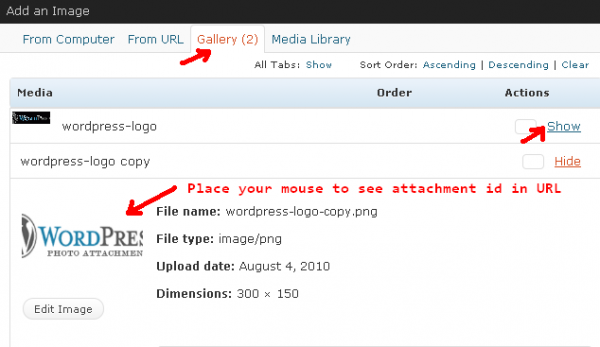
Permalinks on Attachment ID
Permalinks
When an image is uploaded and before it is published, it is assigned a URL that references only that image. http://mydomain.com/path-to-images/?attachment_id=533 This is the case even when an image is assigned to a post in DRAFT.
Once that image is published to a post for the first time, the URL then adopts the permalink of the the parent post or gallery that image is associated with http://mydomain.com/path-to-images/2008/06/post-name/attachment-name/
Images can be reposted in future posts on the blog, but the attachment page will always reflect the parent URL of the original post.
If a post were to get deleted, and it had images that were dependent on it, those images then switch back to having the more basic URL structure that does not reflect the parent post. http://mydomain.com/path-to-images/?attachment_id=533 At this point, both URLs resolve to the basic attachment URL. While these images can be reused in future blog posts, they can never adopt the URL of another parent post.
More information you will on find on this wordpress page
