
Tax season again, and i had to submit all invoices to file taxes. I always wanted a way to automatically generate invoices from the CSV file on a fly, through the sales and billing activity csv file downloaded from 2checkout.
I never liked buying accounting software specifically for this and i believe anything can be done with PHP magic code, which is why i coded myself to accomplish whatever i wanted..This php files feeds on the csv file downloaded from 2checked sales and billing and generates invoices on a fly. You dont need to download or buy any expensive accounting software just to upload csv file and generate invoices.
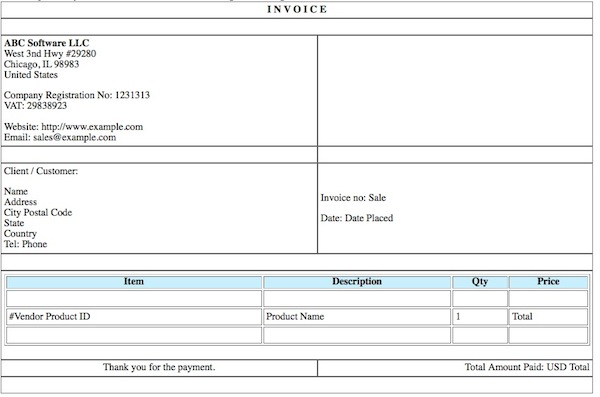
All i had to do is just parse the CSV file using fgetcsv() and echo the data on the format of the invoice. It was pretty easy and i was accomplish this within 2 hrs. You just need to put this php file and the xls file on same folder in xampp or wamp and this script will neatly print invoices for all sales activity.
If you are using 2CO, just download the sales and billing activity, separated by semicolon (;). Note that this script can only parse xls file, separated by semi-colon. if you want to work for comma (,) just tweak the below code. Within this code you can uncomment lines, which is not needed. I have left as it as just to play around.
UPDATE:
I have added 2 new features…
1. You can add VAT, if you invoice to 27 EU countries. Keep in mind that you have to replace .27 (means 27%) in the code at 2 places only then it will compute tax properly.
2. The script will skip reading the first line of the csv file, that is, it drops the header in the csv.
3. Adjust the font size in the css code to whatever you like..
Here is the code…
[php]
<style type="text/css"></pre>
@page { size 8.5in 11in; margin: 2cm }
div.page { page-break-after: always }
table { font: normal 9px arial,verdana ; padding:0; spacing:0 }
table,tr {
border: 1px solid #666;
}
</style>
<?php
/* CSV First Row Array Data Format
Array ( [0] => Sale [1] => Total [2] => Date Placed
[3] => Date Shipped [4] => Name [5] => Address
[6] => City [7] => State [8] => Postal Code
[9] => Country [10] => Phone [11] => Email [12] => Ship To
[13] => Ship Address [14] => Ship City [15] => Ship State
[16] => Ship Postal Code [17] => Ship Country [18] => Date Paid
[19] => Refund [20] => Refund Date [21] => Chargeback
[22] => Chargeback Date [23] => Vendor Product ID [24] => Product Name
*/
$vatc = array ("Austria","Belgium","Bulgaria","Cyprus","Czech Republic",
"Denmark","Estonia","Finland","France","Germany","Greece","Hungary","Ireland",
"Italy","Latvia","Lithuania","Luxembourg","Malta","Netherlands","Poland",
"Portugal","Romania","Slovakia","Slovenia","Spain","Sweden",
"United Kingdom","Switzerland");
if (($handle = fopen("example.csv", "r")) !== FALSE) {
$count=0;
while (($row = fgetcsv($handle, 100000,’\r\n’)) !== FALSE) {
//skip first line header
$count++;
if ($count == 1) { continue; }
$num = count($row);
//echo "<p> $num fields in line $row: <br /></p>\n";
//$row++;
for ($c=0; $c < $num; $c++) {
//echo $c. "<br />\n";
// use comma if you have data separated by commas in explode
$data = explode(‘,’,$row[$c]);
//echo $data[5];
if(in_array($data[9],$vatc)) {
$total = $data[1] – ($data[1]*0.27);
$vat_amt = "VAT (27%): " . $data[1] * 0.27;
} else {
$total = $data[1];
}
?>
<table width="60%" border="0" cellspacing="0">
<tr>
<td ><p align="center"><strong>I N V O I C E</strong></p></td>
</tr>
<tr>
<td > </td>
</tr>
<tr>
<td ><p><strong>ABC Software Inc</strong><br />
Roddington Highway<br>
London E2KJW<br>
United Kingdom<br><br>
Company Registration#: 91-966462 <br>
VAT: EN10928XXXX <br>
<br>
Tel: +44 70 218 2310<br>
www.example.co.uk<br>
info@example.co.uk</p>
<br />
</p></td>
<td ><p><strong>Client / Customer:</strong> </p>
<p> <?php echo $data[4]; ?> <br />
<?php echo $data[5]; ?><br>
<?php echo $data[6]; ?> <?php echo $data[8]; ?><br>
<?php echo $data[7]; ?><br>
<?php echo $data[9]; ?><br>
Tel: <?php echo $data[10]; ?>
<br />
Email: <?php echo $data[11]; ?></br>
</p> </td>
</tr>
<tr>
<td>Invoice no: <?php echo $data[0]; ?> <br>
Date: <?php echo $data[2]; ?></td>
<td>Payment: 2Checkout/2CO</td>
</tr>
<tr>
<td colspan="2"> </td>
</tr>
<tr>
<td colspan="2"><table width="90%" cellspacing="0" align="center" border="1">
<tr>
<th bgcolor="#eee" scope="col">Item</th>
<th bgcolor="#eee" scope="col">Description</th>
<th bgcolor="#eee" scope="col">Qty</th>
<th bgcolor="#eee" scope="col">Price (USD)</th>
</tr>
<tr>
<td> </td>
<td> </td>
<td> </td>
<td> </td>
</tr>
<tr>
<td>#<?php echo $data[23]; ?></td>
<td><?php echo $data[24]; ?></td>
<td>1</td>
<td align="center"><?php echo $total; ?></td>
</tr>
<tr>
<td> </td>
<td> </td>
<td> </td>
<td> </td>
</tr>
</table></td>
</tr>
<tr>
<td align="center">Thank you for the payment.</td>
<td align="left"><br>
<?php if(in_array($data[9],$vatc)) { echo $vat_amt; } ?> <br>
Total Paid: USD <?php echo $data[1]; ?></td>
</tr>
<tr>
<td colspan="2"> </td>
</tr>
</table>
<br>
<?php
//print_r($data);
}
}
fclose($handle);
}
?>
<pre>
[/php]
