
I have always wondered how to detect faces automatically with php script. I have seen in many photo sharing and social network sites automatically detect a face and tag a name after being uploaded.
In this article, i will explain how possible this task can be achieved with simplicity with OpenCV and PHP Facedetect extension. Both are free to download and opensource.
Goal
To auto detect faces in a photo and draw pink box around the faces with a php script running a linux centos server. Please note that face detection and face recognition are two different things. To recognize a face you have to first detect a face and then do the required processing.
Requirements
– Linux server running Centos with SSH access
– PHP/Apache
– GD Library
– OpenCV [Download]
– PHP Facedetect extension [Download]
PHP facedetect extension is very simple. All you have to do is call a function face_detect(p) and it will give all the x,y coordinates in a photo where we draw a square. face_count() will output how many total faces in the given photo. For documentation see here
Installation
We install opencv and then we compile the php facedetect extension with php.
How to Install OpenCV
If you are running centos then one single line will install opencv.
yum install opencv
OpenCV may also need the following depencies to work properly and you will need to install them as well.
yum install ibpng libpng-dev zlib libjpeg libjpeg-dev libtiff libjasper swig python pkgconfig gtk gtk-dev
For more installation instructions on linux see here
The opencv will be installed in/usr/local/share/opencv and all the important facedetection training files known as “haar training” can be found in haarcascades folder in xml format (like haarcascade_frontalface_alt.xml)
How to test run OpenCV
Inorder to test run opencv you have to compile the samples folder. Go to /usr/local/share/opencv/samples/c/
Run this command to compile to binary.
./build_all.sh
If you find large number of errors and variables not declared like shown below..
Package opencv was not found in the pkg-config search path.
Perhaps you should add the directory containing `opencv.pc’
to the PKG_CONFIG_PATH environment variable
No package ‘opencv’ found
….
run
export PKG_CONFIG_PATH=/usr/local/lib/pkgconfig
./build_all.sh
and then it will compile.
To test run the opencv run the following command in the c folder for a test.jpg photo.
./facedetect –cascade=”../haarcascades/haarcascade_frontalface_alt.xml” test.jpg
Since your server does not have Xwindow installed, you probably do not see the output just the processing time.
If you see error “error while loading shared libraries: libcxcore.so.2: cannot open shared object file: No such file or directory” then see this solution
Install PHP Facedetect Extension
Installing the PHP facedetect extension is very easy. Just download the package and compile it for PHP.
wget [download_file_path]
tar zxf facedetect-1.0.0
then
phpize && configure && make && make install
If you see phpize command not found error, install php developer libraries
yum install php-devel
OR
yum install php5-devel
then
open php.ini and make sure you add this line.
extension=facedetect.so
If facedetect has been successful, you will see this enabled in test.php.
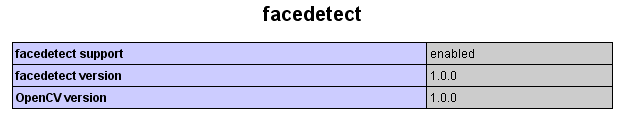
Thats it! all the installation part is over!
Writing a PHP Script
Before you start writing php script make sure you copy all xml files in /usr/local/share/opencv/haarcascades folder to the web folder.
and this simple two lines to from php to call the function
[code lang=”php”]
<?php
//face_count() outputs total faces detected
// face_detect() outputs assoc array of x,y,width,height of each face recognized
$total= face_count(‘test.jpg’,’haarcascade_frontalface_alt.xml’);
$coord= face_detect(‘test.jpg’,’haarcascade_frontalface_alt.xml’);
print_r($coord);
?>
[/code]
Make sure the path of xml files are correct else you would see a blank face or bool(false) output. Once you get this co-ordinates all we have to do is use php gd library to draw square around the face with the above coordinates.
This script will do that and you have call the script with photo file like this http://domain/face.php?file=test.jpg and the test.jpg file should be in the same folder
[code lang=”php”]
<?php
//face.php -> detects faces and draws a pink square on faces
function LoadJpeg($imgname)
{
$im = @imagecreatefromjpeg($imgname); /* Attempt to open */
if (!$im) { /* See if it failed */
$im = imagecreate(150, 30); /* Create a blank image */
$bgc = imagecolorallocate($im, 255, 255, 255);
$tc = imagecolorallocate($im, 0, 0, 0);
imagefilledrectangle($im, 0, 0, 150, 30, $bgc);
/* Output an errmsg */
imagestring($im, 1, 5, 5, "Error loading $imgname", $tc);
}
return $im;
}
$total= face_count($_GET[‘file’],’haarcascade_frontalface_alt.xml’);
$ord= face_detect($_GET[‘file’],’haarcascade_frontalface_alt.xml’);
$im = LoadJpeg($_GET[‘file’]);
$pink = imagecolorallocate($im, 255, 105, 180);
if(count($ord) > 0) {
foreach ($ord as $arr) {
imagerectangle($im,$arr[‘x’] ,$arr[‘y’] , $arr[‘x’]+$arr[‘w’],
$arr[‘y’]+$arr[‘h’], $pink);
}
}
header(‘Content-Type: image/jpeg’);
imagejpeg($im);
imagedestroy($im);
?>
[/code]
Just remember haarcascade_frontalface_alt.xml are haar training files used for face detection. You can play around with other training files like to detect various body parts, not just faces.
haarcascade_frontalface_alt.xml
haarcascade_frontalface_alt_tree.xml
haarcascade_fullbody.xml
haarcascade_profileface.xml
haarcascade_lowerbody.xml
haarcascade_upperbody.xml
Conclusion and the Results

(standard test image used for image processing)
I have given multiple frontal detection photos to the script and the script performed well, despite few false face detections. One sample output file is shown below with the pink boxes detected by the script as faces. Unfortunately i can only show the blurred faces because of personal reasons.
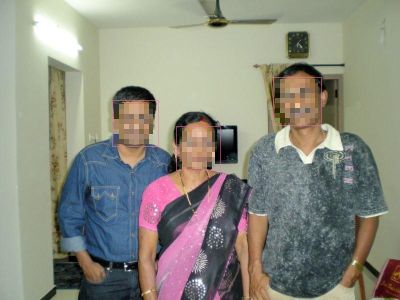
I should say i am pretty surprised the way the multiple faces are detected and the results are good with haarcascade_frontalface_alt.xml as training file . To get more accurate results, you need to do haar training to xml files to produce more accurate results.
Other Useful Links
Facedetection with pure PHP without OpenCV [visit site]
Facedetection with javascript [visit site]
OpenCV Face Detection Page [visit site]
Enjoy!
