

I have seen many people asking me how to integrate a simple javascript based editor to wordpress comments form to markup html or bbcode tags. Here is how you do it and its simple.
I will be working on the prototype of this free markup editor and i will be tweaking a bit to make it very simple and later i will be integrating to wordpress comments form. It will insert bbcode or html tags to selected text to wordpress comments form.
Here is how the editor will look like upon integrating to wordpress comments form. Please bear with me that i am keeping it very simple specific to main coding. Later you can play around with styling and colors for buttons.
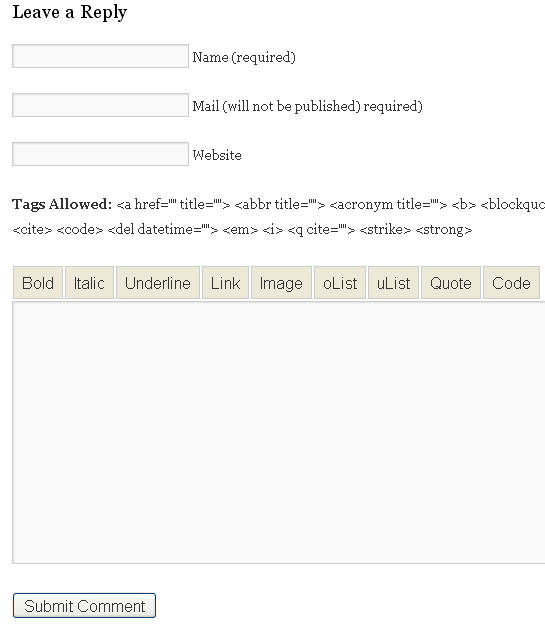
Step 1:
Go to comments.php which can be found in your theme folder wp-content > themes > yourtheme > comments.php and on the bottom locate this line and remove it. I am assuming that the current theme is twentyten which is wordpress default theme.
<?php comment_form(); ?>
Replace above line with below code
[php]
<h3 id="respond">Leave a Reply</h3>
<form action="<?php echo get_option(‘siteurl’); ?>/wp-comments-post.php" method="post" id="commentform">
<p>
<input name="author" id="author" value="" size="22" tabindex="1" type="text">
<label for="author">
<small>Name (required)</small>
</label>
</p>
<p>
<input name="email" id="email" value="" size="22" tabindex="2" type="text">
<label for="email">
<small>Mail (will not be published) required)</small>
</label>
</p>
<p>
<input name="url" id="url" value="" size="22" tabindex="3" type="text">
<label for="url">
<small>Website</small>
</label>
</p>
<p>
<small><strong>Tags Allowed:</strong> <?php echo allowed_tags(); ?> </small>
</p>
<p> <link rel="stylesheet" type="text/css" href="<?php bloginfo(‘template_directory’); ?>/bbeditor/styles.css" />
<script type="text/javascript" src="<?php bloginfo(‘template_directory’); ?>/bbeditor/ed.js"></script>
<script>edToolbar(‘comment’); </script>
<textarea name="comment" id="comment" cols="100" rows="10" tabindex="4"> </textarea>
</p>
<p>
<input name="submit" id="submit" tabindex="5" value="Submit Comment" type="submit">
<input name="comment_post_ID" value="<?php echo $id; ?>" type="hidden" >
<?php do_action(‘comment_form’, $post->ID); ?>
</p>
</form>
[/php]
As you notice from the above code, all you need is just 3 lines to initiate the javascript editor. It should be above textarea.
[sourcecode language=”javascript”]
<link rel="stylesheet" type="text/css" href="<?php bloginfo(‘template_directory’); ?>/bbeditor/styles.css" />
<script type="text/javascript" src="<?php bloginfo(‘template_directory’); ?>/bbeditor/ed.js"></script>
<script>edToolbar(‘comment’); </script>
[/sourcecode]
I will just be using input buttons and wont be using any images to implement this editor. If need be i can specify css code in styles.css to customize the button look.
Step 2:
(i) Create a new folder in your theme, lets say beditor and .
(ii) Depending on whether to insert bbcode or html, download the zip file.
To insert bbcode tags, download this zip file
To insert html tags, download this zip file
You will see 2 files and some images in the zip file. Just place just the ed.js and style.css in your newly created beditor folder. Nothing else needed for the editor to work.
Note: If you want bbcode to be parsed by wordpress, you will need to use this wordpress bbcode plugin without it your bbcodes wont work.
If you have not used css or removed the styles.css file, the editor will look with just buttons.

P.S: I am keeping it very simple and i will just be focusing on the core wordpress integration and later you can play around with css, colors and backgrounds of buttons.
