
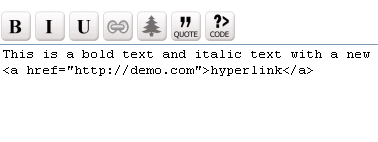
A dead simple, fast loading, light weight and easy to use html markup editor for your projects. It is the ultimate textarea replacement. It does not use iframes instead it just replaces textarea into an editor where you can insert basic html markup codes like bold, italic, hyperlink, image, blockquote and more..
Much of the inspiration of this editor came from the editor used in wordpress forums. I really loved the simplicity of the editor used there. The reason i kept as textarea editor instead of using iframes (which gives rich html) is because iframe based editors are subjected too many injection attacks.
Features
– Inserts HTML codes in textarea
– No iFrames
– Fast loading and lightweight (code just under 2kb)
– Works on all major browsers
– No popup html window for inserting hyperlinks.
– Easy to integrate
– Inserts quick html code
– Inserts ordered and unordered lists (new feature)
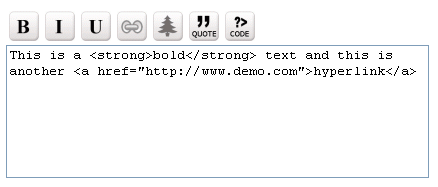
This editor is 100% FREE and feel free to use this editor in your projects or do whatever you want. Please spread word by any means possible.
Note:This editor inserts html code. If you want a same editor, capable of inserting bbcode, you can download free bbcode editor
Free Icons
If you want to customize the editor with new icons you can download silk icons set. It is free!
How to Install
1. Just extract the folder and upload editor folder to your server. All the editor code and images are inside that folder. You should not run any php scripts inside this folder. Any html or php script calling this editor must above and outside this folder
2. Create a PHP script or html page (ex: example.php ) and initialize the editor with the below code.
Starting the Editor
To initialize the editor, you have insert the following lines
1. Place this code inside the of the html page inside head tag.
[sourcecode language=”html”]
<script type="text/javascript" src="editor/ed.js"></script>
[/sourcecode]
2. Place this 2 lines of code within the form or wherever you want the textarea editor to appear. The name and id of textarea could be anything, just make sure that both are same.
[sourcecode language=”html”]
….
<script>edToolbar(‘mytxtarea’); </script>
<textarea name="mytxtarea" id="mytxtarea" class="ed"></textarea>
…..
[/sourcecode]
Note: Make sure that the id value and the value inside of edToolbar () is same.
If you want multiple instances of editors, on same page
[sourcecode language=”html”]
<form name="form1" method="post" action="">
<p>
<script>edToolbar(‘mytxtarea’); </script>
<textarea name="mytxtarea" id="mytxtarea" class="ed">This is a sample text</textarea>
</p>
<p>
<script>edToolbar(‘mytxtarea2’); </script>
<textarea name="mytxtarea2" id="mytxtarea2" class="ed">This is a sample text</textarea>
</p>
<p>
<script>edToolbar(‘mytxtarea3’); </script>
<textarea name="mytxtarea3" id="mytxtarea3" class="ed">This is a sample text</textarea>
</p>
<p>
<input type="submit" name="Submit" value="Submit">
</p>
</form>
[/sourcecode]
The default height and width of text area is specified in styles.css. It is 400px width and 150 height. You can open styles.css and modify the width and height of text area.
Frequently Asked Questions
1. How do i customize the editor with stylesheet?
It is easy to customize the images and editor with stylesheet. Just change stylesheet code in styles.css
2. Images does not appear or does not load.
There could be a problem in the path of images the editor relative to your PHP script. Just place the bbeditor folder below / assuming that php script is in /example.php and the editor is /bbeditor/images
if you want to manually change the path of images, open ed.js and you will need to change lines like this indicating the correct path of images.
[sourcecode language=”javascript”]
document.write("<img class=\"button\" src=\"editor/images/bold.gif\" name=\"btnBold\" onClick=\"doAddTags(‘<strong>’,'</strong>’)\">");
…..
[/sourcecode]
3. How do i load the data stored in database to the editor for editing?
This is a very important question. Suppose you have inserted the content with bbcodes to the database but what if you want to make changes to the content. You might want to pull the content from database and load it in editor to make editing and changes to it. In that case you will need to output the javascript initialization with php. In this way you will load the content when the editor starts.
[sourcecode language=”html”]
<form name="form1" method="post" action="">
<p>
<script>edToolbar(‘mytxtarea’); </script>
<textarea name="mytxtarea" id="mytxtarea" class="ed">//PHP CODE HERE//</textarea>
</p>
<p>
<input type="submit" name="Submit" value="Submit">
</p>
</form>
[/sourcecode]
4. How do i add this editor to wordress comments form?
Glad you asked! It can be done easily. see this page
5. Where can i find more icon sets to use with this editor?
Note that because of copyright issues, i havent used the icon sets created by others in this editor. That is why i created my own editor icons (may not the best but good to go). I have seen many many open source icons and you can find them this page.
7. Is there any license to remove copyright on this script?
yes, you can remove the copyright in this script to use this editor in your projects. There is a one time $30 fee copyright removal fee. This small money will help me to buy a movie ticket.
This grants you unlimited license including removing copyright and use this script in your commercial projects. I do not provide support with this script.
Disclaimer: use of this script is at your own risk.
Enjoy the editor!
