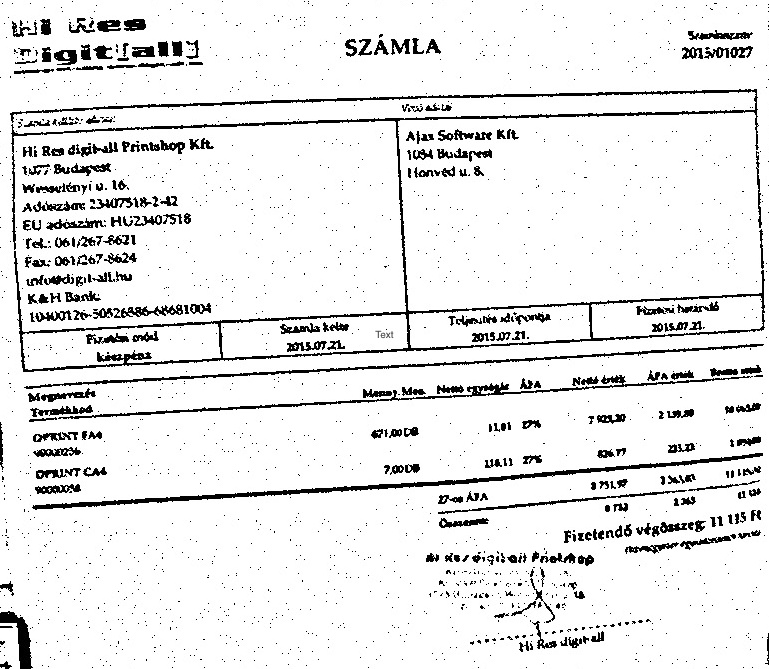
I have been such a lazy user of scanners. I really hate pulling up a scanner everytime to scan small documents, then to scan, copy and email, such a tedious work for me. These days there are cameras everywhere in mobile phones, computers and laptops. Even there are apps to use video camera as scanner. I decided it to try it for myself and found out that with few lines of code using opencv and python, you can capture document scans from video camera.
I first converted the video data to grayscale then to black and white image (for clarity) and then capture a frame. I applied adaptive threashold mean algorithm which works very well and noise free.
Lets see the code:
import numpy as np
import cv2
import pylab as pl

cap = cv2.VideoCapture(0)

# take first frame of the video
ret,frame = cap.read()

while(True):
    # Capture frame-by-frame
    ret, frame = cap.read()

    # Our operations on the frame come here
    gray = cv2.cvtColor(frame, cv2.COLOR_BGR2GRAY)

    #Display the resulting frame
    thresh = cv2.adaptiveThreshold(gray,255,cv2.ADAPTIVE_THRESH_MEAN_C,cv2.THRESH_BINARY,25,9)
    cv2.imshow('frame',thresh)

    if cv2.waitKey(1) & 0xFF == ord('q'):
        cv2.imwrite("snap.jpg", thresh)
        break

# When everything done, release the capture
cap.release()
cv2.destroyAllWindows()
This code will show a live video, grab a document, show it to the camera, press q key to capture and quit and this will save a image. Then cut the image to whatever you want and convert to pdf. You can see a sample output below (deliberately made to look unclear). This is just a frame capture using a video camera.
I noticed that shakes are a major problem. I tried applying canny edge detection later on this image, but simple thresholding done great job!